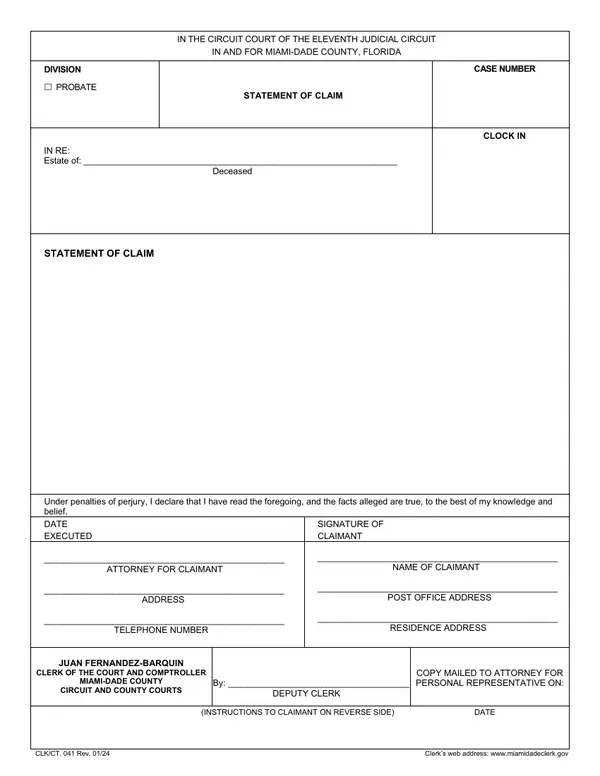
About Statement of Claim
A creditor submits a claim against a decedent's estate during probate proceedings to assert their right to payment from estate assets.
When you'd use it: File this form when you are a creditor owed money by a deceased person's estate and wish to present your claim for payment during the probate process.
Where to get the official form
The official version of Statement of Claim is published as a PDF by the Florida courts. We checked this link and it resolved to a form on an official court or government website — always download the current version directly from the source rather than a third-party copy:
Verified official PDF
Download Statement of Claim (PDF) →
Source: miamidadeclerk.gov
Link last checked: May 30, 2026
How to file Statement of Claim in Florida
- Step 1 — Confirm you have the correct formUse Statement of Claim (CLK/CT. 041) when file this form when you are a creditor owed money by a deceased person's estate and wish to present your claim for payment during the probate process. Double-check it's the right form for your situation — Florida probate forms are revised periodically, so verify the name and number against your court's current form list before you start.
- Step 2 — Complete every required fieldFill out Statement of Claim carefully and review it for errors before filing. Probate cases can already take months — a small mistake on the form can set your timeline back further.
- Step 3 — Get it notarized or witnessed if requiredSome probate forms must be signed in front of a notary or witnesses. Check the instructions on the form itself, and arrange notarization before you file if it's required.
- Step 4 — File it with the correct courtSubmit Statement of Claim to the probate court or county clerk handling the estate — usually in the Florida county where the deceased lived. Ask the clerk how they prefer to receive filings (in person, by mail, or e-filing).