Pennsylvania Probate Form RW-09

Inventory

This page is for educational purposes only and is not legal advice. Forms and requirements change frequently — verify the current version with your local probate court or an attorney.

Last updated: June 1, 2026
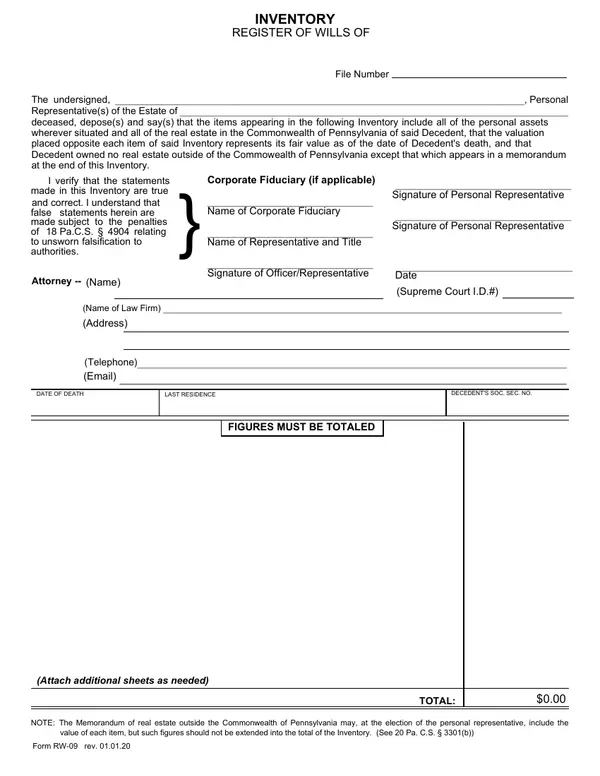
First page of Inventory

Working through the Inventory? SwiftProbate builds a personalized, step-by-step checklist for settling the estate — so you know which forms to file, in what order, and by when.

Get help with this form

About Inventory

Declares all personal assets and real estate of the decedent as of the date of death, with fair valuations for estate administration.

When you'd use it: Filed by the personal representative with the Register of Wills in Pennsylvania after the decedent's death to report and value all estate assets.

Where to get the official form

The official version of Inventory is published as a PDF by the Pennsylvania courts. We checked this link and it resolved to a form on an official court or government website — always download the current version directly from the source rather than a third-party copy:

Verified official PDF

Download Inventory (PDF) →

Source: beavercountypa.gov

Link last checked: May 30, 2026

How to file Inventory in Pennsylvania

  1. Step 1Confirm you have the correct formUse Inventory (RW-09) when filed by the personal representative with the Register of Wills in Pennsylvania after the decedent's death to report and value all estate assets. Double-check it's the right form for your situation — Pennsylvania probate forms are revised periodically, so verify the name and number against your court's current form list before you start.
  2. Step 2Complete every required fieldFill out Inventory carefully and review it for errors before filing. Probate cases can already take months — a small mistake on the form can set your timeline back further.
  3. Step 3Get it notarized or witnessed if requiredSome probate forms must be signed in front of a notary or witnesses. Check the instructions on the form itself, and arrange notarization before you file if it's required.
  4. Step 4File it with the correct courtSubmit Inventory to the probate court or county clerk handling the estate — usually in the Pennsylvania county where the deceased lived. Ask the clerk how they prefer to receive filings (in person, by mail, or e-filing).

Working through the Inventory? SwiftProbate builds a personalized, step-by-step checklist for settling the estate — so you know which forms to file, in what order, and by when.

Get help with this form

Probate in Pennsylvania

See the full Pennsylvania probate guide for filing deadlines, small-estate options, timelines, costs, and county courthouse details.

Read the Pennsylvania probate guide →

Frequently Asked Questions

What is Inventory (RW-09)?
Declares all personal assets and real estate of the decedent as of the date of death, with fair valuations for estate administration. You'd typically use it when filed by the personal representative with the Register of Wills in Pennsylvania after the decedent's death to report and value all estate assets.
Where do I file Inventory in Pennsylvania?
Probate forms are filed with the probate court or county clerk in the Pennsylvania county where the deceased person lived. Our Pennsylvania probate guide can help you find the right courthouse, filing fees, and local requirements.
Do I need a lawyer to complete Inventory?
Many people complete probate forms themselves, especially for smaller or uncontested estates. Complex estates may benefit from professional advice. SwiftProbate is an informational tool that helps you understand and organize the process — it is not a law firm and does not provide legal advice.
Is Inventory available online?
Most Pennsylvania probate forms are published as PDFs by the state courts or the county clerk. You can find the official source linked above.

Other Pennsylvania Probate Forms

Need help with Pennsylvania probate?

  • Personalized to your assets, heirs, and jurisdiction
  • Deadlines calculated from your date of death
  • Track progress and store documents in one place
Get step-by-step help

Free — no credit card required

Informational guidance only — not legal advice

Find the other Pennsylvania probate forms you'll need →

Disclaimer: This page is for informational purposes only and does not constitute legal advice. Probate forms and requirements vary by state, county, and individual circumstances, and change over time. Always verify the current form and instructions with your local probate court, and consult a qualified attorney for advice specific to your situation. SwiftProbate is not a law firm and does not provide legal representation.